Installing on-prem clients
The Celonis On-Prem Clients (OPC) serve as a secure gateway, enabling the Celonis Platform to extract data from local systems without modifying your corporate firewall rules. By establishing a secure outbound connection, the OPC allows you to continuously ingest transactional data, such as purchase orders or invoice records, to surface and remediate execution gaps in your core business processes.
Because this setup requires both cloud platform configuration and local server access, deployment is a collaborative effort between the Celonis Team Admin and your IT Infrastructure Admin.
Important
Before you begin, verify your SAP system architecture. If your network utilizes SAP Process Integration (PI) or SAP versions 4.6C and older, you must deploy the SAP Extractor client using the uplink integration framework rather than the standard OPC configuration. See Local extraction.
Understanding the OPC deployment workflow
This diagram illustrates a secure "Inside-Out" connection strategy. Unlike traditional setups, the Celonis Platform never reaches into your network; instead, the On-Prem Client reaches out to Celonis.
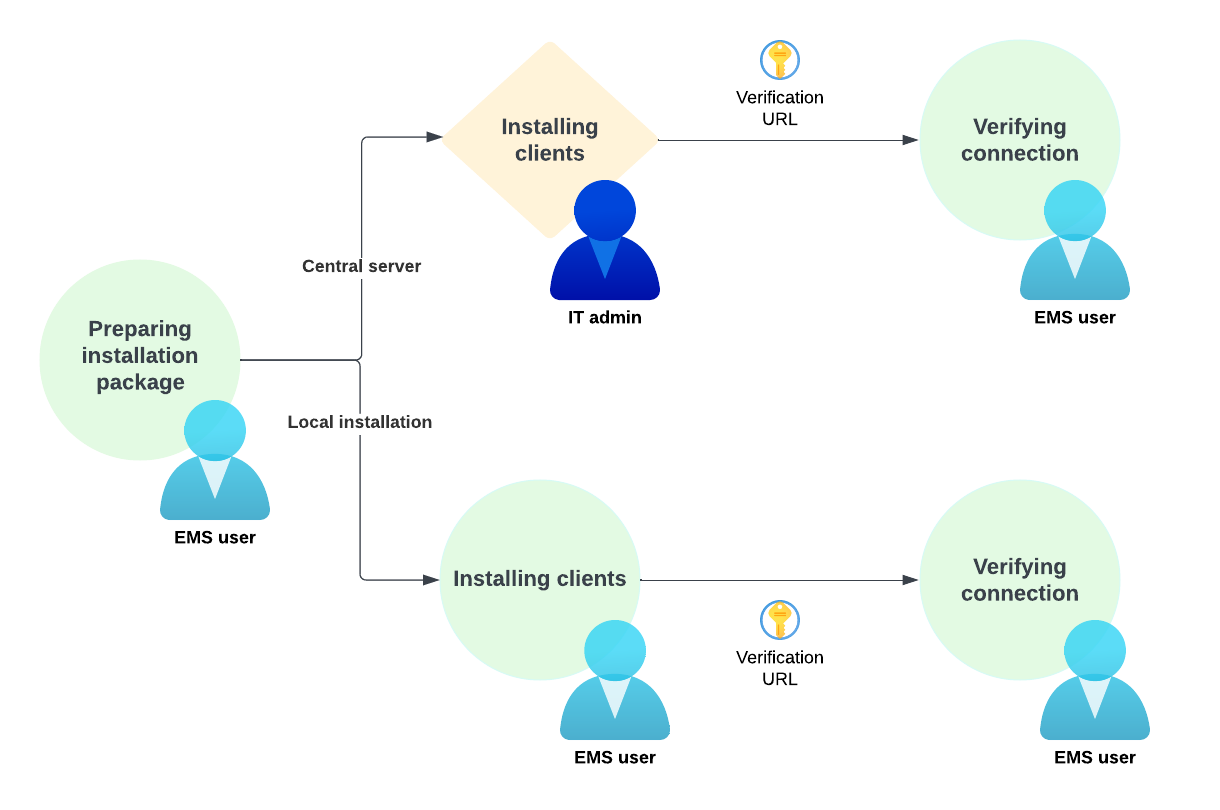 |
Deployment stage | Responsible persona | Functional objective |
|---|---|---|
Stage 1: Package preparation | Celonis Team Admin | Generate a unique connection set in the Celonis Platform and download the configuration package containing the team authentication credentials. |
Stage 2: Installation and local handoff | IT Infrastructure Admin | Deploy the OPC agent on a local server (Windows, Linux, or Mac) and point the agent toward the source data systems. |
Stage 3: Secure uplink and verification | End-to-End Collaboration | Establish the encrypted outbound connection to the Celonis Verification URL and verify that the platform status displays "Connected". |
Installing the on-prem client
Select your target operating system to proceed with the local agent installation: