Appendix: Value Calculation Logic
In line with the Celonis Value Methodology:
The Value Realized within the Transformation Hub in Views is calculated using a cumulative value methodology.
The calculation determines the total realized value by taking the very first recorded value log (the Initial Value Realized) and adding the sum of all subsequent marginal (incremental) changes. This ensures that the baseline value established at the start of tracking is maintained as the foundation, and all incremental progress builds on top of it.
Example: Tracking a "Reduce Manual Rework" Opportunity
To understand how this calculates in practice, consider an Opportunity in the Accounts Payable process aimed at reducing manual rework. You have configured an Action Flow to automatically resolve specific invoice discrepancies (e.g., automatically removing a delivery block if the quantity difference is within an acceptable threshold).
Every time the Action Flow successfully runs and clears a block, it avoids manual intervention from an AP clerk. The system continuously logs this avoided manual effort as realized financial value.
In this scenario:
Date | Log Entry Event | Current Value Realized (Logged) | Marginal Value |
|---|---|---|---|
Feb 01 | Initial Action Flow Execution (First batch) | $100 | $0 (No previous log) |
Feb 08 | Action Flow Execution (Week 1 total) | $350 | $250 |
Feb 15 | Action Flow Execution (Week 2 total) | $800 | $450 |
Total Displayed Value Realized: $800.
This cumulative methodology ensures that business users viewing the Value Tracking Overview see the true, comprehensive financial impact of their automated actions from the exact moment the Action Flow was first triggered.
The Value Realized at a specific moment in time (a key KPI in the app) for rate-based opportunities is calculated only based on the baseline rate, current rate, volume and impact for that particular timestamp. Unlike the approach used for action-based value tracking, the total value realized is independent of other log entries.
One consequence of this is that the logged value realized reflects the current status at the time of logging. Therefore, unlike for action-based opportunities, there is no distinction between the “Date of Logging” and the “Date of Value Realization”.
However, this also makes the calculation of the value realized in a given year more difficult compared to action-based opportunities. As a brief reminder, the value realized for a rate-based opportunity is calculated as follows (simplified):
If increase is an improvement:
Value Realized = (Current Rate - Baseline Rate) *Volume * Impact
If decrease is an improvement:
Value Realized = (Baseline Rate - Current Rate) * Volume * Impact
There are two main ways how this can be used to calculate the value realized in the current year:
The Volume only includes the volume of the current year. This makes sense e.g. for an improvement of the early payment rate. For that example, the Volume reflects the total invoice amount paid in that year. Any baseline improvement in the early payment rate is only applied to those invoices, making the resulting Value Realized KPI the value realized in that year. Wherever possible, this should be the approach used.
For some KPIs, that is not possible. Let’s take a look at the Excess Inventory Volume. There, Current Rate and Baseline Rate refer to the Excess Inventory Rate, Volume refers to the Current Inventory Level, and Impact to the capital cost caused by inventory. The Current Inventory Level is always there, it is logically not possible to calculate the “Inventory of the current year”. In such cases, the baseline rate has to be updated at the turn of the year. If the Baseline Rate reflects the rate at the end of the previous year, any difference between Baseline Rate and Current Rate has been achieved in the current year, making the resulting Value Realized KPI the value realized in that year.
A combination of the two approaches is also valid. Please take this into account when setting up your logging mechanism. Either the Volume or the Baseline Rate need to be adjusted at the turn of the year. Ideally, this should not require a manual action, but instead be built into the PQL logic of the KPIs that are being tracked. As an example, the KPI logged as the Volume in the Early Invoice Payment case could be the total invoice value filtered to the current year only using e.g. ROUND_YEAR( TODAY() ) in PQL.
The specific logic of rate-based opportunities have several implications that need to be understood:
The value realized in a past year is the last value realized logged in that year
The value realized in the current year is the last value realized logged in the current year
The value realized can fluctuate and does not necessarily increase linearly as it does for action-based opportunities. For the example of the Early Payments used above, a slight increase in the Early Payment Rate compared to the previous log entry likely triggers a slight decrease in the value realized.
Let’s explore the following examples:
First, an opportunity where the Volume only includes the volume of the current year. A decrease is considered an improvement for this opportunity. For simplicity, let’s assume the impact is constantly 1 across the full history.
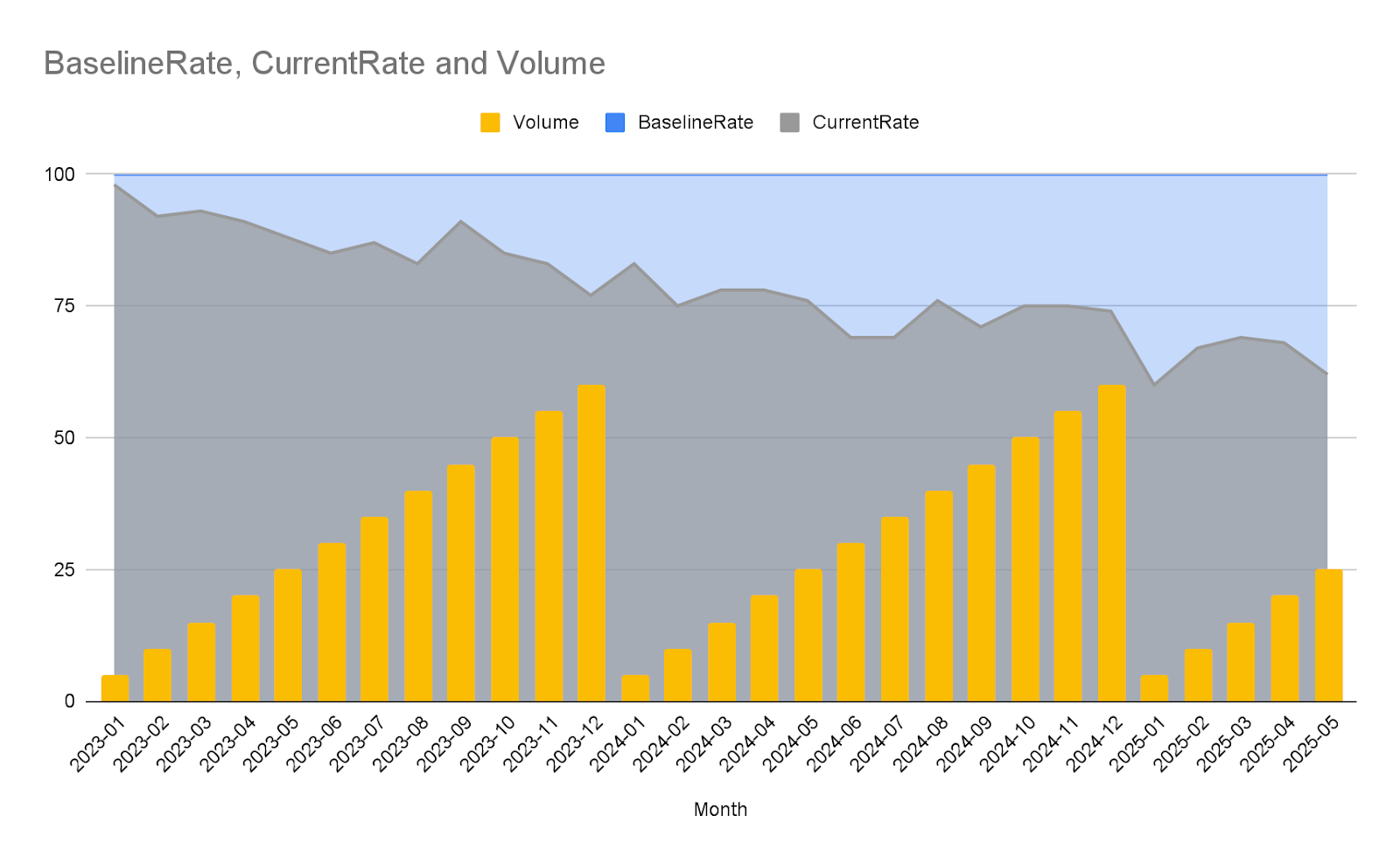
The blue area highlights the KPI improvement achieved compared to the benchmark.
The value realized in the current year at any given time is (based on the information that a decrease is considered an improvement):
Value Realized, current year= (Baseline Rate-Current Rate) *Volume *Impact
Since the Volume restarts with 0 at the beginning of the year, the entire value realized of the current year also restarts at 0.
Value Realized, current year (01/2024)= (100-83) *5 *1=85
The total value realized in a year is the same formula applied to the last data tracked for a year.
Value Realized (2023)=Value Realized, current year (12/2023)=(100-77)*60*1=1380
Value Realized (2024)=Value Realized, current year (12/2024)=(100-74)*60*1=1560
Value Realized (2025)=Value Realized, current year (05/2025)=(100-62)*25*1=950
The total value realized is the sum of the value realized in each year for which tracked data is available.
Value Realized (Total)=Value Realized (2023)+Value Realized (2024)+Value Realized (2025) = 1380+1560+950=3890
Second, an opportunity where the Volume of the current year cannot be clearly determined, but the baseline is updated at the turn of each year. An increase is considered an improvement for this opportunity. For simplicity, let’s assume the impact is constantly 1 across the full history.
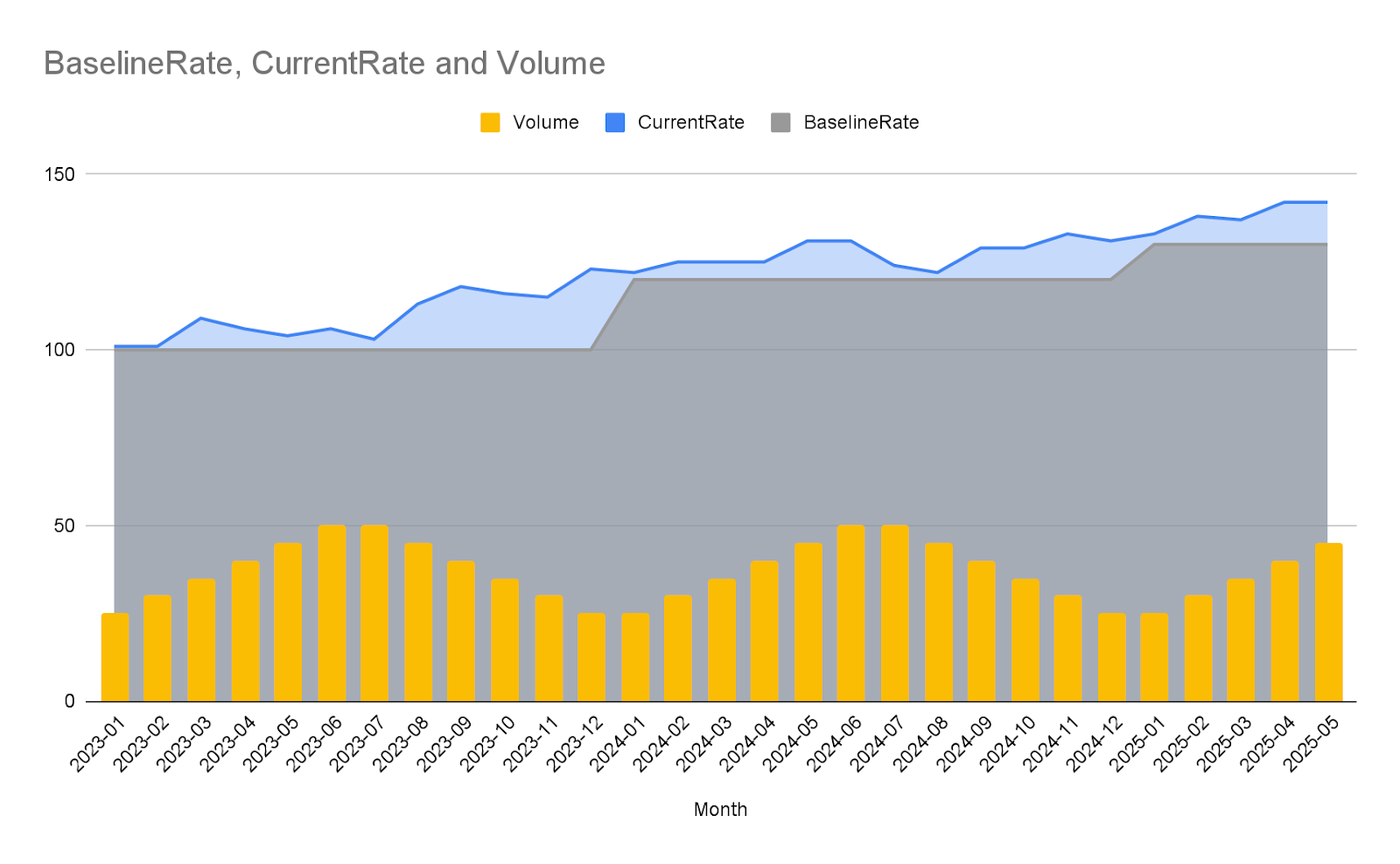
The blue area highlights the KPI improvement achieved compared to the benchmark.
The value realized in the current year at any given time is (based on the information that an increase is considered an improvement):
Value Realized,current year =(Current Rate -Baseline Rate) *Volume *Impact
Since the Baseline Rate is updated at the beginning of the year, the entire value realized of the current year restarts at 0.
Value Realized, current year (01/2024)= (122-120) *25 *1=50
The total value realized in a year is the same formula applied to the last data tracked for a year.
Value Realized (2023)=Value Realized, current year (12/2023)=(123-100)*25*1=575
Value Realized (2024)=Value Realized, current year (12/2024)=(131-120)*25*1=275
Value Realized (2025)=Value Realized, current year (05/2025)=(142-130)*45*1=540
The total value realized is the sum of the value realized in each year for which tracked data is available.
Value Realized (Total)=Value Realized (2023)+Value Realized (2024)+Value Realized (2025)
Non-Monetary value tracking focuses on quantifiable benefits that do not represent a direct cash flow. Similar to Action-Based tracking, the Value Realized KPI at any moment in time is calculated as the total cumulative sum of all logged value entries up to that point.
This approach is used for benefits such as Hours Saved or CO2 reduced. Each log entry should record the impact generated by a specific action or over a scheduled period, allowing the cumulative sum to reflect the total non-monetary benefit achieved over time. Because it calculates cumulative impact, the logic of distinguishing between a "Realized At" timestamp and the "Date of Logging" is applicable, similar to Action-Based tracking, allowing for flexible and accurate reporting of when the value (e.g., hours saved) was actually recognized.