Transformation Hub in Views
The Transformation Hub in Views app provides a centralized, interactive platform for monitoring and managing your organization’s digital transformation. By moving value tracking into the Views framework, Celonis offers a more flexible and granular way to connect process improvements to bottom-line impact.
This app acts as your "Value Command Center," allowing different stakeholders to interact with data tailored to their needs:
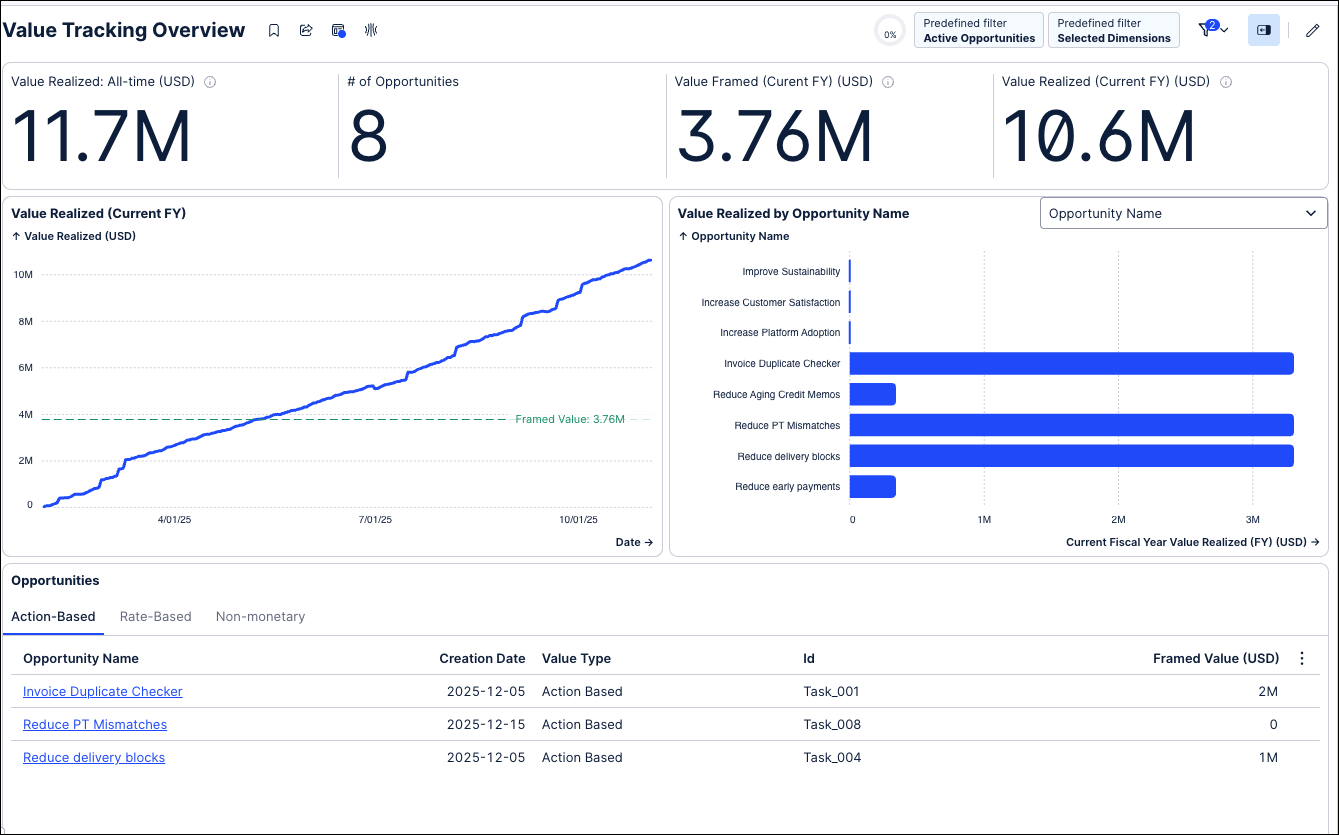
Executive visibility: High-level KPIs like Value Realized and Framed Value per Year provide an immediate snapshot of ROI.
Performance tracking: Use Development Charts to track progress throughout the year and Drilldown Charts to compare success across departments, regions, or processes.
Granular deep dives: Opportunity owners can analyze specific rate-based or action-based use cases to see exactly how value is calculated and where performance can be optimized.
Centralized governance: The Admin Workbench allows the Center of Excellence (CoE) to manage and configure all value opportunities in one place.
The Transformation Hub in Views app requires the following:
KPI Snapshot Service: This feature must be activated first, as the app is built on the centralized data model created by this service. See: KPI Snapshots
Object-Centric Data Model (OCDM): The app requires a functional OCDM to handle object transformations and writeback capabilities. See: Objects and Events
To ensure saved KPIs map correctly to their respective opportunities within the application, adhere to the following snapshot requirements. Note that a KPI snapshot and an opportunity maintain a one-to-one relationship.
Snapshot requirements by opportunity type
Action-Based and Non-Monetary Opportunities: Save the Value Realized KPI as a single dedicated snapshot.
Rate-Based Opportunities: Save all four mandatory KPIs within a single dedicated snapshot:
Baseline rate
Current rate
Impact
Volume
For detailed definitions and examples of Action-Based, Rate-Based, and Non-Monetary opportunities, see: Appendix: Value Calculation Logic.
Installing the App: Deploy the specialized Transformation Hub in Views package from the Celonis Marketplace into your Studio. This establishes the frontend Views and the underlying structure for your value tracking.
Configuring the OCDM: Connect the app to your Object-Centric Data Model. This step is critical for ensuring the app can "speak" to your business objects (like Invoices or Purchase Orders) and pull the correct data for value calculations.
Configuring Action Flows and writeback connection: Bridge the gap between insight and action. By setting up Writeback, you allow users to update opportunity statuses or framing details directly within the View, which then syncs back to your data records.
Configuring the remaining object transformations: Ensure data integrity across your entire ecosystem. This step involves mapping any secondary or custom objects to the Transformation Hub's schema, ensuring that every relevant data point is captured in your value reporting.
Configuring the Admin workbench: Define the "rules of engagement." In this step, you'll configure how opportunities are created, who can edit them, and how the app handles different value types (Rate-based vs. Action-based).
Configuring dimensions: Tailor the analytics to your business hierarchy. By defining dimensions (e.g., Region, Business Unit, or Vendor), you enable the Drilldown Charts that allow executives to see exactly which parts of the business are driving the most value.