Get Tasks (Action Flow)
The Get Task Action Flow module returns the Task IDs of the Tasks that you picked. You can use this information to update a Task once it is created.
If you want to use the OAuth connection method for your Action Flow, your OAuth app must have the following scopes assigned to it:
tasks:read
knowledge-models:read
For more information, see Registering your OAuth client and Available OAuth scopes.
In your Action Flow editor, go to edit mode.
Click the '+' icon to add a new module.
Search for Celonis.
Select Get Tasks.
Configure your module by entering the following values:
Knowledge Model: Select the Knowledge Model of the record of which you would like to get all Tasks.
Record: Select the Record for which you would like to get all Tasks.
Record Identifier: Put the identifier of the Record. This unique identifier is defined in the KM.
Task Status: Specify for which subset of Tasks you want to get the ID. If you leave it empty, the action returns you the ID of all Tasks - regardless of their Status.
Assignee: Specify for which subset of Tasks you want to get the ID. If you leave it empty, the action returns you the ID of all Tasks - regardless of their Assignee.
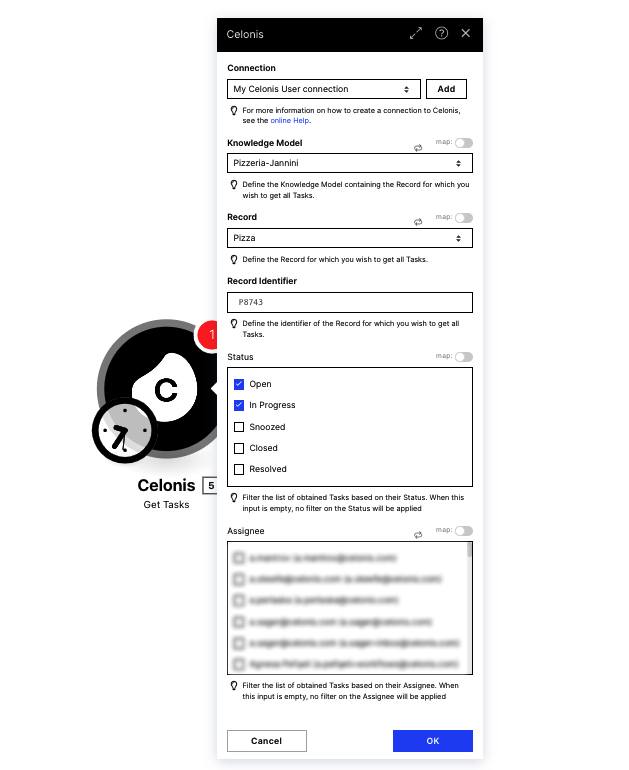
Save your changes and deploy the Action Flow to make it operational.