February 2026 Release Notes
February 27, 2026
IMPROVED STUDIO New object-centric performance metrics in the Multi-Object Process Explorer
The new Synchronization tab introduces object-centric performance metrics in the Multi-Object Process Explorer component, which allow you to view the range of event lead times, execution times, and synchronization times for all objects in a process. These new metrics include:
Event Lead Time: The total duration from when the earliest input object becomes available to the completion of that specific event. Event Lead Time can be thought of as the total amount of time needed for the preparation and execution of all steps in the process.
Synchronization (Sync) Time: The time between when the first and last input objects arrive at a shared event. Sync Time captures the delay caused by waiting for all involved objects to be ready.
Execution Time: Amount of time from when all input objects are available to when execution is complete. During this period, all objects are ready and nothing is blocked on the data side, but no action occurs.
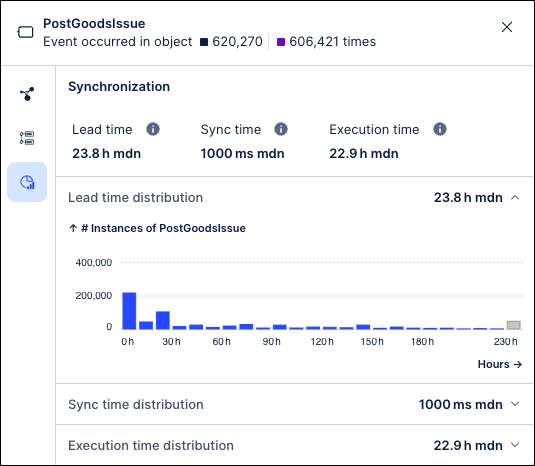
These metrics are computed for all shared events in the process and can be viewed on the Synchronization tab by clicking the event node in the process graph. The Synchronization tab shows the range of times for each metric and how frequently each time value occurred across the events in this process. In addition, these metrics also provide the average, median and trimmed median values.
These metrics are available out-of-the-box and can help to identify critical bottlenecks in your processes such as:
How long does it take events with multiple objects/shared events/events requiring multiple inputs to complete? (Event Lead Time)
How much time is spent waiting for all inputs to arrive? (Sync Time)
How long does a process idle once all inputs are ready? (Execution Time)
For more information, see Event node details.
February 26, 2026
IMPROVED STUDIO Reusing View modules across packages
You can now use View modules across different Studio packages.
Previously, you could only reuse modules within your own package. This new functionality gives increased flexibility by allowing View module reuse across packages. Published changes to the reused View Module can be updated as required.
For more information, see Reusing View modules across packages.
February 25, 2026
IMPROVED OBJECTS AND EVENTS Creating events from tables
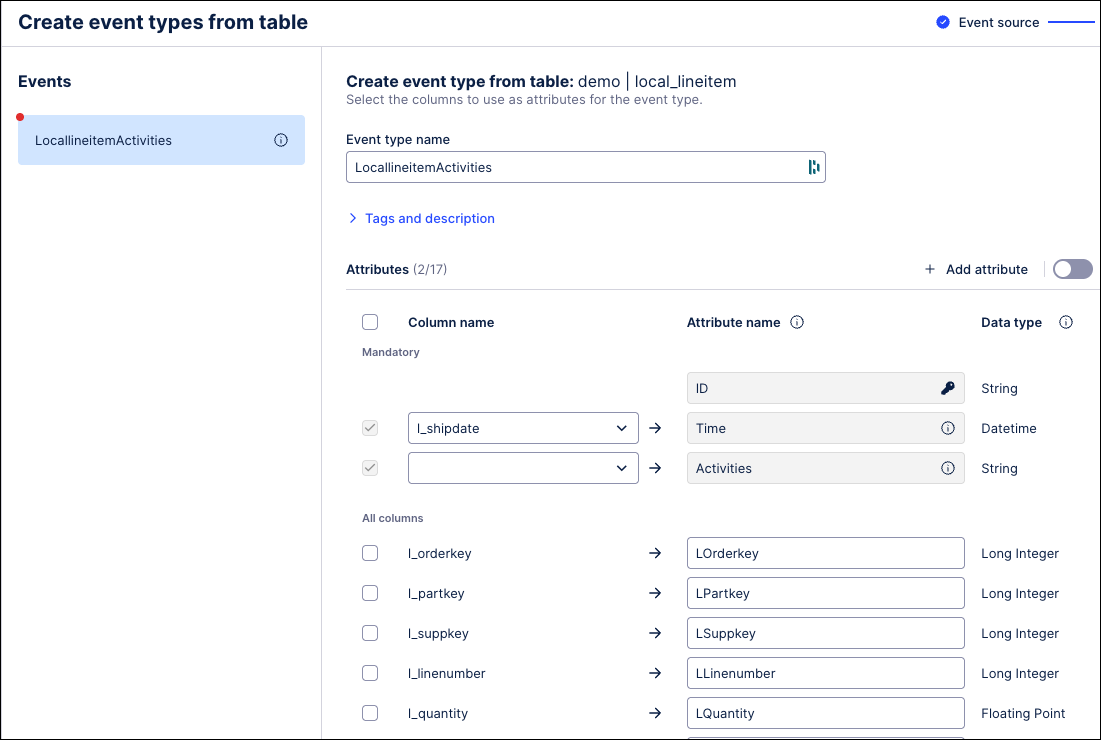
Data engineers and analysts can now create event types directly from raw source data. This enhancement streamlines event modeling by automatically generating the SQL transformations that map event types and relationships to the data. It also enables bulk event creation and configuring event-to-object relationships.
Using the import wizard, an event will follow the raw data if it fits one of the three supported structures:
A column(s) of the table represent an event(s)
A row in the table represents an event (as an event log)
A row in the table represents an event (change table with old value / new value)
To learn more about creating events from tables, see: Events.
 |
February 24, 2026
IMPROVED AUTOMATION Updates to Task Types
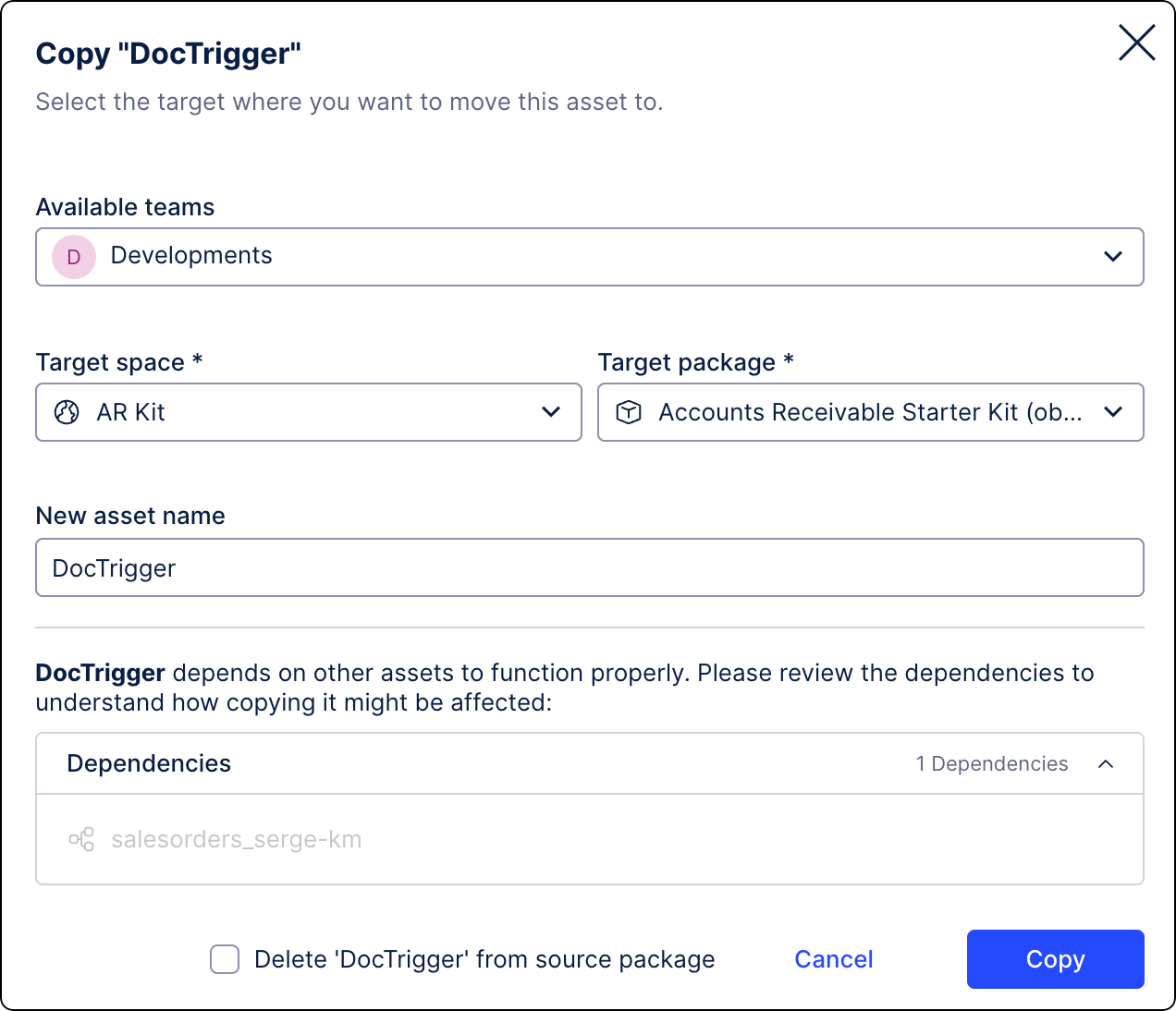
You can now easily copy Task Types across your Celonis Platform instance to a different team, space, and package. See Copying Tasks Types.
We’ve added a Task Type Status column to the Task Management screen to help you monitor the health of your Tasks. The column displays the current status and flags errors in two categories: errors (critical errors) and warnings (operational issues). For more information, see Troubleshooting Task Types.
NEW AUTOMATION STUDIO Call Process Copilots from your Action Flow modules
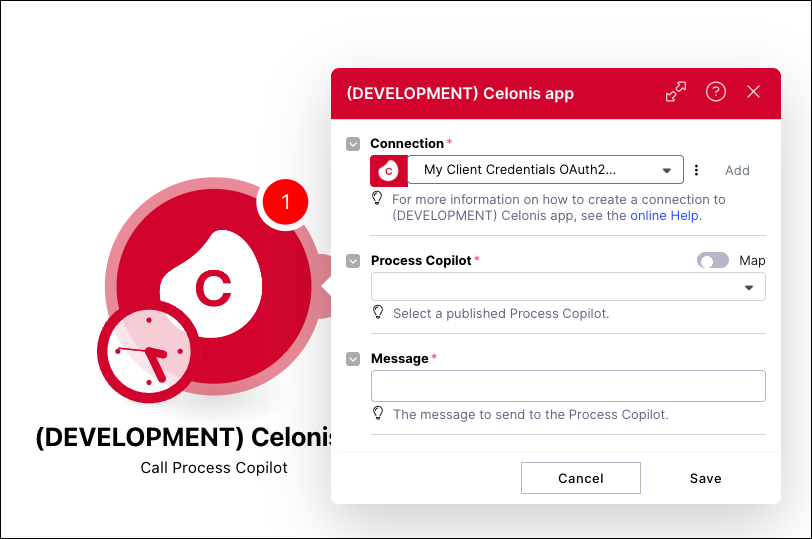
Action Flows are being upgraded with a new module that can be used to trigger your existing Process Copilots. This new “Call Process Copilot” module is used to create custom messages that are passed in real-time to your Process Copilot assets. Adding this module removes the need to create workaround solutions using custom code in order to connect your Action Flows to your Process Copilots.
The module can be configured by selecting your connection and the Process Copilot you want to connect to from this Action Flow. You can then create the custom message you want to send using both plain text and Action Flow variables. When the Action Flow is executed, the responses from the Process Copilot are displayed automatically and include the response, the reasoning, and the conversation ID. These calls can also be tracked on the Process Copilot Monitoring screen.
For more information, see Call from Action Flows.
IMPROVED OBJECTS AND EVENTS Attribute sorting added to objects and events
You can now manually control the display order of attributes for your objects and events, which were previously ordered alphabetically. After updating the attribute order and deploying your changes to development or production, the new order will be reflected in both your transformation jobs and the Knowledge Model.
While attribute ordering doesn't impact processing logic, it improves readability, usability, and governance by allowing you to present your data in a logical and consistent structure.
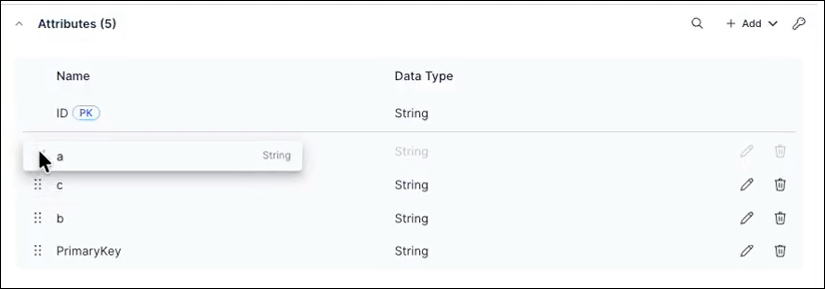
To learn more about creating and managing objects and events, see: Objects.
February 23, 2026
NEW STUDIO Switching annotation lines between primary and secondary chart axes
You can use annotation lines in charts to indicate thresholds and targets. Annotation lines are displayed by default for the primary axis of your chart. If your chart has both primary and secondary axes, you can now toggle annotation lines between these axes using the Annotation line settings panel:
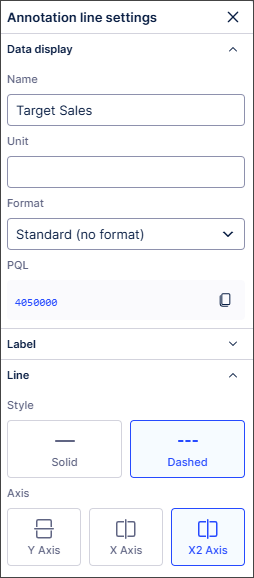
The annotation lines will track correctly against the scales used for each axis, ensuring they are always contextually accurate.
For more information, see Chart annotation lines.
NEW TASK MINING Task Mining Client software version 2.21.0
We've released a new version of the Task Mining Client software. This version includes general improvements.
In addition, we’ve added the remote suspension of Task Mining data capture for Private Preview customers only.
For more information, see the Task Mining install file release notes.
And for more information about our private preview releases, see Feature release types.
PUBLIC PREVIEW STUDIO Performance Spectrum component added to Views
With this public preview release, you can now add a Performance Spectrum component to your Studio Views.
Traditional process explorers show aggregated views that can overlook real process dynamics. The Performance Spectrum adds a time-based perspective, revealing how tasks interact and evolve. It highlights variations, bottlenecks, and performance shifts that are often hidden in aggregations, giving you clearer insights into how your processes truly run.
In this example, the Performance Spectrum helps a government agency to visualize how individual fines move through a defined sequence over time. This helps them to identify bottlenecks and validate that specific process patterns (like batching) are adhered to and stay consistent over time (e.g. throughout the year).
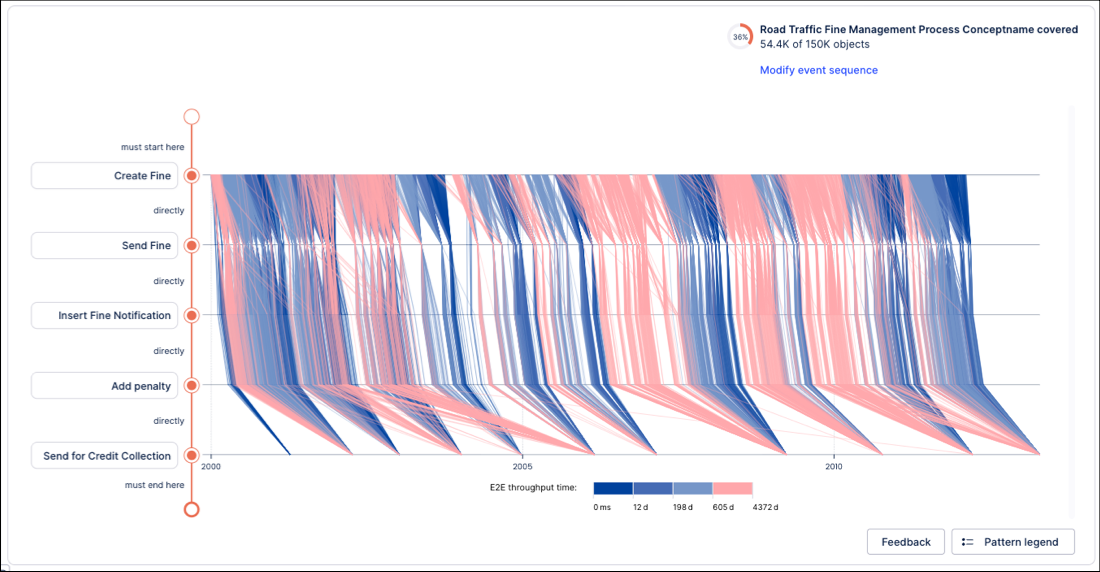
To understand more about this use case and to learn how to configure and use the Performance Spectrum, see: Performance Spectrum
And to read more about our private and public preview releases, see: Feature release types.
PUBLIC PREVIEW OBJECTS AND EVENTS Define composite primary keys on object-centric data model attributes
For source systems where uniqueness is defined by multiple attributes, Objects and Events now supports composite primary keys. Composite primary keys allow you to define a primary key using more than one attribute directly in the data model. This removes the need to manually concatenate attributes in transformation logic and helps improve query performance.
Previously, all object and event types in the object-centric data model required a single ID attribute with a String data type. This attribute served as the PK, uniquely identifying each row and enabling joins across objects and events. For source systems with composite PK (multiple columns), users had to manually concatenate these columns into a single ID using SQL transformations.
You can now define the PK for objects and events in one of two ways:
Single ID attribute (legacy approach): Provide your own ID column as the PK, as before.
Composite PK: Select multiple attributes to form a composite PK.
For more information, including a step-by-step guide to defining composite primary keys, see: Composite primary keys.
February 19, 2026
NEW STUDIO Agent Tools (MCP) now in General Availability
The Agent Tools (MCP) feature is a new Studio Asset that enables AI agents to securely access and interact with Celonis data and insights using the Model Context Protocol (MCP). The Agent Tools asset provides ready-to-use tools that can be used by AI agents to search for relevant information, retrieve real-time process context, trigger actions in external systems, and write decisions back to the Celonis Platform.
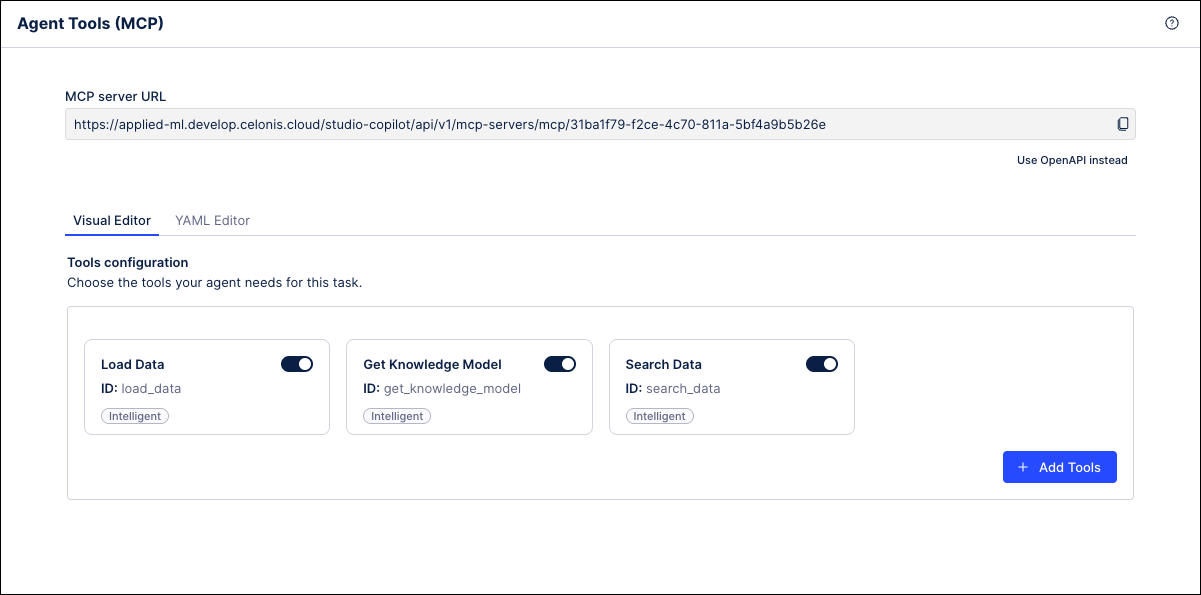 |
Agent Tools can be created as new assets in Studio and then configured with the tools you want to make available to AI agents through the MCP. These tools can include data retrieval functions, insight generators, knowledge model queries, and more. Once the new asset is published, it will generate a unique URL that serves as an endpoint that can be connected to by other MCP clients.
For more information, refer to Agent Tools (MCP) in the Celonis Developer Center.
February 18, 2026
IMPROVEDPROCESS DESIGNER PROCESS NAVIGATOR Process Cockpit updates
We've updated the Process Cockpit to be more intuitive and user friendly.
UI Changes
The selected date range is now located in the user menu. By default, it shows the last 30 calendar days.
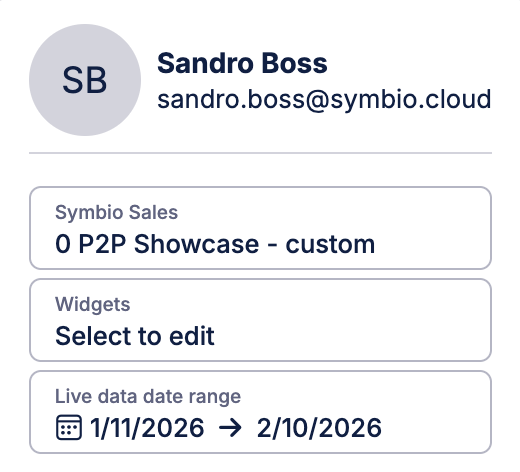
In Process Navigator, the Process Journey view now has a Live Data Card that shows the selected date range (for customers using the Canvas app, this card can also be seen in Process Designer)
The live data check now has a message explaining the difference between what is seen in Process Designer and how it is displayed in Process Navigator
Performance enhancements
Live data values are now rounded to two digits after the comma
When the user selects % as a unit, the selected value will be recalculated to be displayed as a percentage (x 100)
For more information, refer to Activating and configuring live data and Process Cockpit.
IMPROVED PROCESS DESIGNER Bugfixes
This release focuses on "under-the-hood" excellence and highly requested fixes for escalated customers:
Improved loading speeds for the Orphan view
Enhanced security and data consistency across the platform
UI updates:
Added alphabetical sorting for corona objects (to improve searchability)
Resolved the "grayed out" Refresh button issue
February 16, 2026
REMOVED BUSINESS MINER Business Miner service removed from the platform
Our Business Miner service has been removed from the platform and has already been replaced by our AI-driven Insight Explorer and Studio features.
With these advanced capabilities, you’ll benefit from:
Enhanced intelligence: Advanced AI integration and deeper customization options.
No additional cost: These features are already included in your Celonis Platform offering and can be used today at no extra cost.
Easy transition: With our Celonis Academy course, you can efficiently transition away from Business Miner.
As a result of the removal of this service, the Business Miner navigation item has been removed from the navigation bar and no users can access the service. As our Quickstarts feature rely on the use of Business Miner features, we have also removed these from the platform.
To get started with Insight Explorer, see: Insight Explorer.
REMOVED DATA INTEGRATION Quickstarts options removed from platform
Following the deprecation of the Business Miner service, the associated data integration Quickstarts have been removed from the platform. As these Quickstarts were only used to establish initial connections to source systems, this change does not affect existing workflows - any connections created with a Quickstart will continue to function as before.
To learn how to connect your source system to the Celonis Platform using our Extractor Builder options, see: Connecting data sources
February 12, 2026
NEW STUDIO Process Copilot Smart Routing
You can now create a “router” Process Copilot in Studio and use it to choose the correct tool for your specified task. To take advantage of this router Process Copilot, you can build a series of focused Process Copilots with specific skills or for a defined scope and then surface them as tools to the router. Then your users can interact with the router and use it to perform any of the tasks provided by the associated tools.
For example, you can build one Process Copilot per domain or one Process Copilot for each task. This allows each Process Copilot to keep its focus narrow and maintain high quality. You can then expose each of these focused Process Copilots as individual tools to the router Process Copilot. The router can then search these tools to find the Process Copilot that best fits the needs of each request.
Note
Each call to a Process Copilot being used as a tool is made with a new id, so the chat history is not preserved from previous calls made to that same tool.
When creating the Process Copilots to be used as tools, it is important to provide clear and accurate descriptions to help the router identify its functionality. Each of the Process Copilots being surfaced as tools must be published in the same Space as the router.
February 11, 2026
PRIVATE STUDIO Consistent event log colors across Process Mining Components
With this private preview release, the colors assigned to event logs will remain consistent across all your process mining components and assets. This means that the color assigned in the Event Log Builder or visual editor will be used for that event log in all of your process mining components, such as Process Explorer, Variant Explorer, Process Adherence Manager (PAM), Event Explorer, Case Explorer, Throughput Time (TPT) Explorer and any associated process filters. If the assigned color is changed in the Event Log Builder or visual editor, the change will be updated automatically across all components.
As part of this release, the color palette used for event log colors has been refreshed to make the available colors easier to distinguish from one another and improve the accessibility of the colors used in the process mining components.
To learn more about our Private Preview releases, see: Feature release types.
IMPROVED STUDIO New object-centric performance metrics in Event Explorer
The new Synchronization tab introduces object-centric performance metrics in the Event Explorer component, which allow you to analyze the arrival times of various objects at specific interaction points in the process. These new metrics include:
Event Lead Time: The total duration from when the earliest input object becomes available to the completion of that specific event. Event Lead Time can be thought of as the total amount of time needed for the preparation and execution of all steps in the process.
Synchronization (Sync) Time: The time between when the first and last input objects arrive at a shared event. Sync Time captures the delay caused by waiting for all involved objects to be ready.
Execution Time: Amount of time from when all input objects are available to when execution is complete. During this period, all objects are ready and nothing is blocked on the data side, but no action occurs.
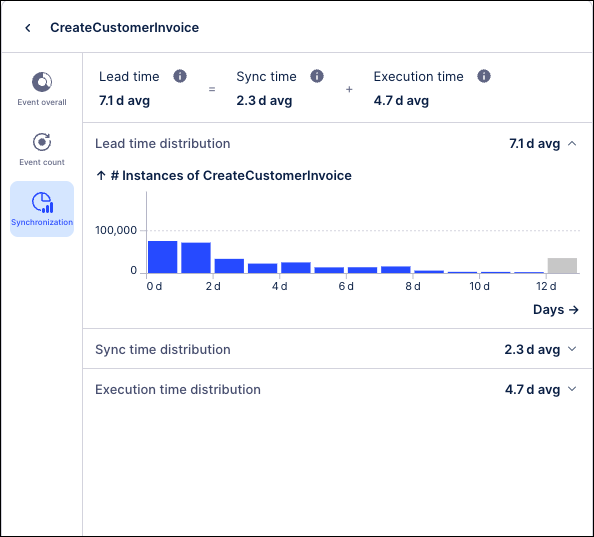 |
These metrics are computed for all shared events in the process and can be viewed on the Synchronization tab in the Event Explorer by clicking the arrow to the right of the Event logs column. The Synchronization tab shows the range of times for each metric and how frequently each time value occurred across the events in this process.
These metrics are available out-of-the-box and can help to identify critical bottlenecks in your processes such as:
How long does it take events with multiple objects/shared events/events requiring multiple inputs to complete? (Event Lead Time)
How much time is spent waiting for all inputs to arrive? (Sync Time)
How long does a process idle once all inputs are ready? (Execution Time)
For more information, see Event Explorer Component.
NEW ADMIN Choosing Celonis Platform themes
You can now choose the color theme used in the Celonis Platform, allowing you to adjust the user interface colors and contrast to suit your needs.
You can select the following preset themes from your user profile management screen:
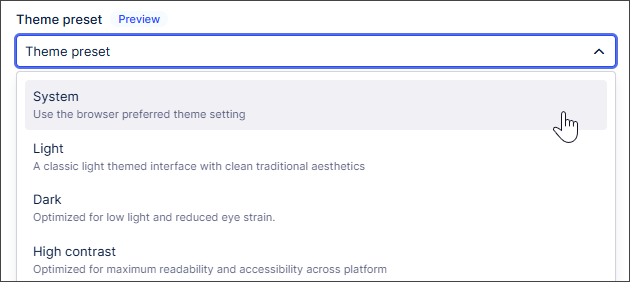 |
System: Uses the browser preferred theme settings.
Light (default): Classic, clean light-themed interface.
Dark: Optimized for low light and reduced eye strain.
High Contrast: Designed for maximum readability and accessibility.
You can also switch between light and dark color themes from Studio Package settings:
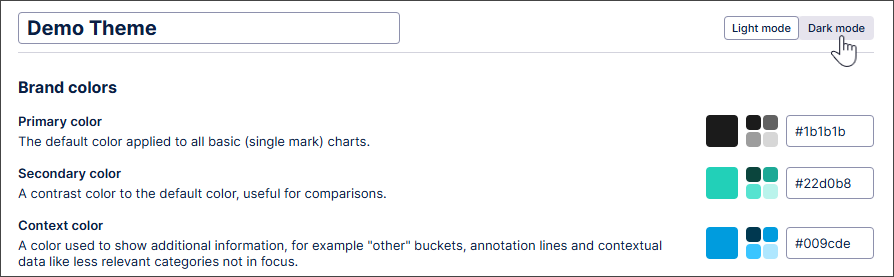 |
With the addition of the dark mode platform theme, we've also expanded Studio color themes to support dark mode-specific color options. This means you can ensure your custom brand color themes remain readable even when users have dark mode enabled.
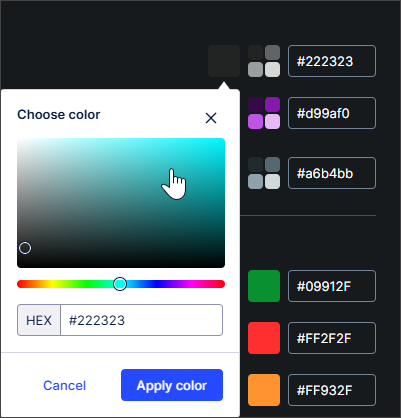 |
The dark mode colors match light mode by default. Users can manually override these colors to provide better contrast or visibility against dark backgrounds. This customization specifically applies to Custom Brand Color Themes; Celonis default themes already include automatic translation for dark mode support.
Note
The following products do not support themes: Analysis, Action Flows, Advanced Views, Simulation Asset, Transformation Center, Business Miner, Forms, and Celonis Process Management (CPM).
For more information about choosing the theme for your Celonis Platform experience, see Managing your user profile. And to find out more about colors in Studio Views, see Color themes.
February 9, 2026
FIXED TASK MINING Incorrect labeling of some Microsoft applications
We've fixed an issue with the incorrect labeling of some applications in Task Mining.
Previously, Microsoft applications such as Microsoft Outlook were sometimes automatically and incorrectly labeled as Microsoft Teams, potentially giving an inaccurate view of the amount of time users spend using Microsoft Teams.
With this fix, all Microsoft applications will now be labeled correctly during Task Mining. This fix will be automatically applied to all current Task Mining projects and may result in changes to your Workforce Productivity app data for those Task Mining projects.
For more information, see Task Mining default Labels: Microsoft Office. And to find out more about the Workforce Productivity app, see Working with Task Mining data.
February 6, 2026
REMOVED BUSINESS MINER Deprecating Business Miner service
Our Business Miner service is being deprecated and has already been replaced by our AI-driven Insight Explorer and Studio features.
With these advanced capabilities, you’ll benefit from:
Enhanced intelligence: Advanced AI integration and deeper customization options.
No additional cost: These features are already included in your Celonis Platform offering and can be used today at no extra cost.
Easy transition: With our Celonis Academy course, you can efficiently transition away from Business Miner.
To prepare for this deprecation, the Business Miner navigation item has been moved down a level and an in-platform notification informs your users of the forthcoming deprecation. As our Quickstarts feature rely on the use of Business Miner features, we have also removed these from the platform.
And to get started with Insight Explorer, see: Insight Explorer
IMPROVED OBJECTS AND EVENTS Improved control over catalog updates
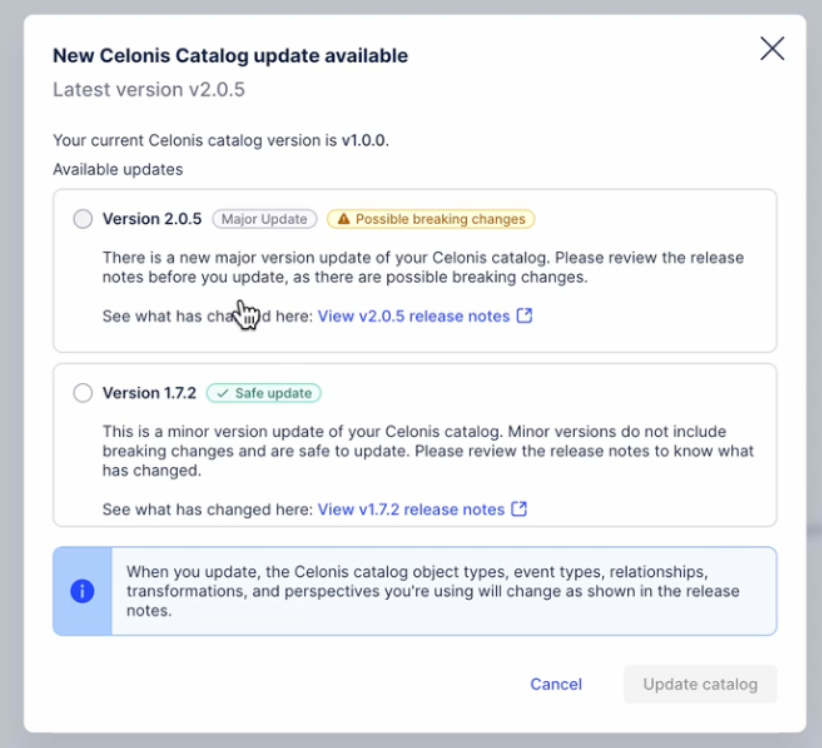
Teams using Celonis core-process catalog v3.0.0 or higher now benefit from two enhancements to both automatic and manual catalog update workflows.
Auto-updates: Catalog auto updates now apply only to minor and patch releases to reduce the risk of unexpected breaking changes. Upgrading to a major release now requires a manual catalog update.
Manual updates: You can now choose whether to upgrade to the latest major version or stay on the latest minor/patch update.
To learn more about updating your catalog version, see: Core process catalog.
PRIVATE STUDIO Technical connection for View Reports
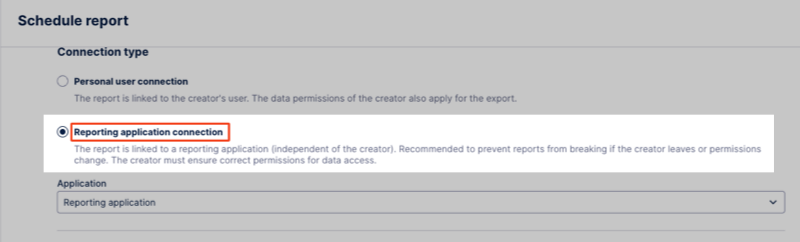
When scheduling and managing your View Reports, you can now choose between creating a personal connection, where the report is linked to an individual user in the team, or a technical connection.
A technical connection allows you to link a report or report trigger to a team account instead of an individual user in the Celonis Platform. By assigning View permissions to this connection, the report or trigger remains accessible and active even if the original creator leaves the team or loses Celonis Platform access.
In this example, the report is configured for a technical connection:
 |
To create a technical connection, a team admin must create a reporting application in the Admin & Settings area. For more information, see: Technical connection for View reports.
And to learn more about scheduling and managing View reports, see: View Reports.
February 5, 2026
PRIVATE STUDIO Migrating translations from an Analysis to a View
With this Private Preview release, you can now import translations from a Data Model to a Studio package.
Translations in an Analysis use Data Model name mappings. In Views, translations are saved in the package settings. To migrate translations, the name mappings can now be imported to the package settings.
When migrating an Analysis to a View, the translation syntax is automatically updated during the migration and uses the translation keys from the package, with no changes required in the Analysis or View. Users can then select their preferred language from the View Translations menu.
For more information about migrating Analyses, see Migrating Analysis to Views and for information specific to this functionality, see Migrating translations from an Analysis to a View.
And for more information about our private preview releases, see Feature release types.
IMPROVED AUTOMATION OAuth 2.0 available for Action Flows
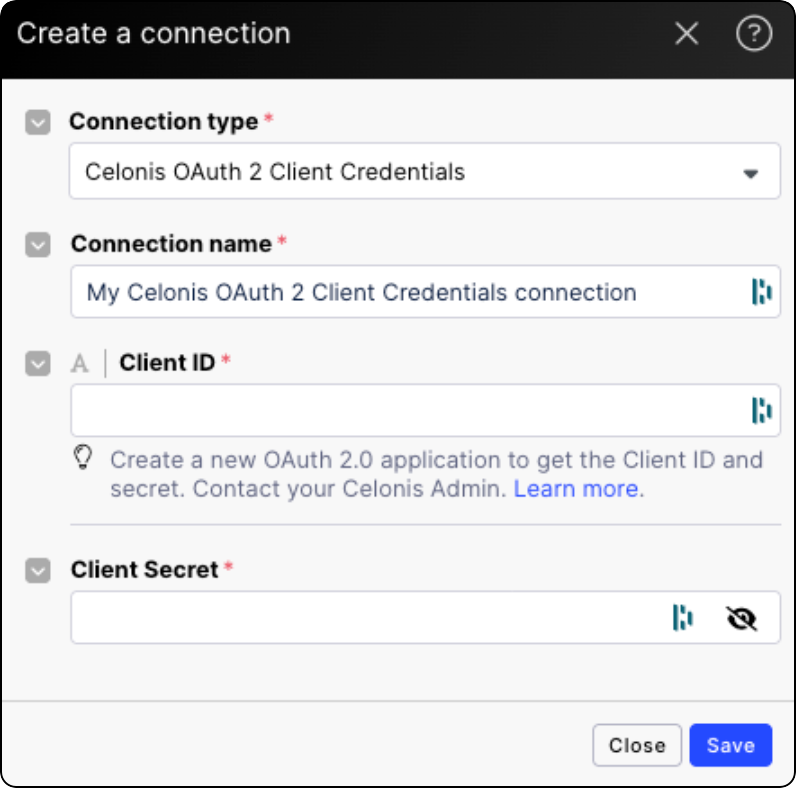
We’re introducing OAuth 2.0 as a connection method for all Celonis Action Flow modules. This industry-standard framework allows applications to interact securely on your behalf without sharing sensitive credentials. You can find OAuth as a connection type in Action Flow modules. This connection type requires a Celonis Admin to create an OAuth client first to obtain client ID and client secret (basic type). See Adding OAuth client to Celonis Platform.
February 4, 2026
NEW AUTOMATION Annotation Builder in Process Orchestration
Annotation Builder, our AI-enhanced Studio asset for processing and labeling data, can now be used as a starting step for Process Orchestrations. This allows you to automatically trigger subsequent orchestration steps based on the specific findings and labels generated within Annotation Builder.
For more information, see Annotation Builder and Orchestration Engine.
IMPROVED ADMIN Improved permissions management experience
We’re introducing a refreshed permissions management experience that improves how administrators view and manage access across the platform.
This release includes:
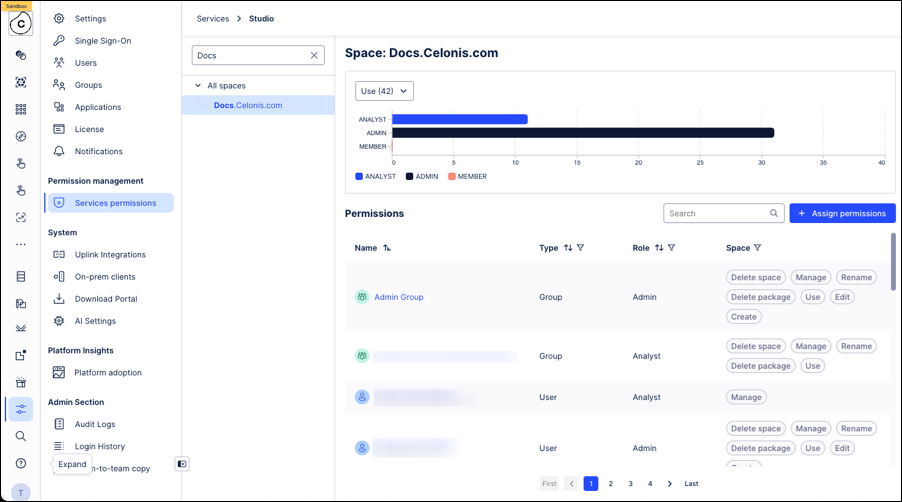
A single, consolidated admin interface for viewing, granting, and managing permissions within Admin & Settings.
A new permissions interface that replaces checkbox-based controls with a chip-based model, making it clearer and easier to grant or remove permissions across users and teams.
An updated central authorization service that supports the new permissions experience.
While this update focuses on improving clarity, consistency, and usability for administrators, the underlying permission model remains unchanged:
There are no changes to permission behavior, access levels, or role definitions.
Existing user access remains exactly the same.
To learn more about managing your user permissions, see: Managing permissions.
IMPROVED OBJECTS AND EVENTS Updated Related Objects interface for one-to-one relationships
The interface for the Relationships to objects tab in the Objects and Events module has been updated to provide a clearer overview of your object-to-object relationships. In this new interface, the Outgoing and Incoming tabs have been replaced with a single list that shows all your one-to-one relationships on one page.
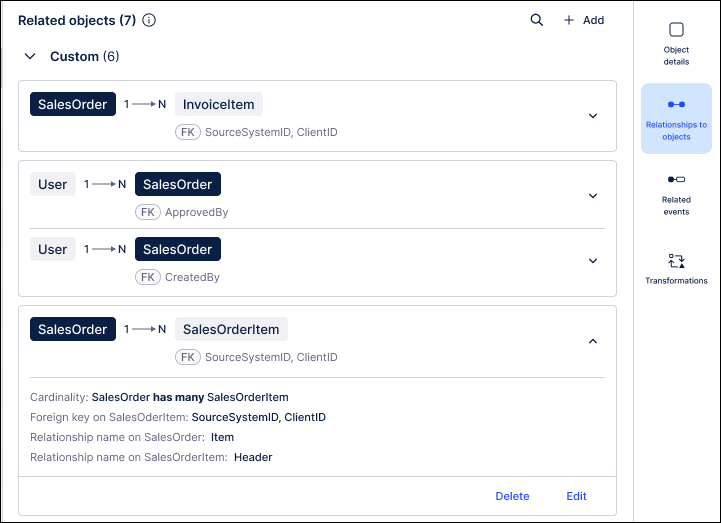
In this new list, the positioning of the objects on the card is meant to reflect their positioning within the relationship. For example, all one-to-many relationships will display the 1-sided object on the left. For many-to-many relationships, the current object will be displayed on the left. If there is a join table in the relationship, it will be displayed between the two objects.
 |
The list also uses the color of the chips to differentiate between the objects in the relationship. A dark chip will always be used for the current object and a light chip is displayed for the other objects. You can also click on a light chip to be taken to the page for that object.
For more information, see: Modeling objects and events.
February 2, 2026
PRIVATE STUDIO Insight generation within Views
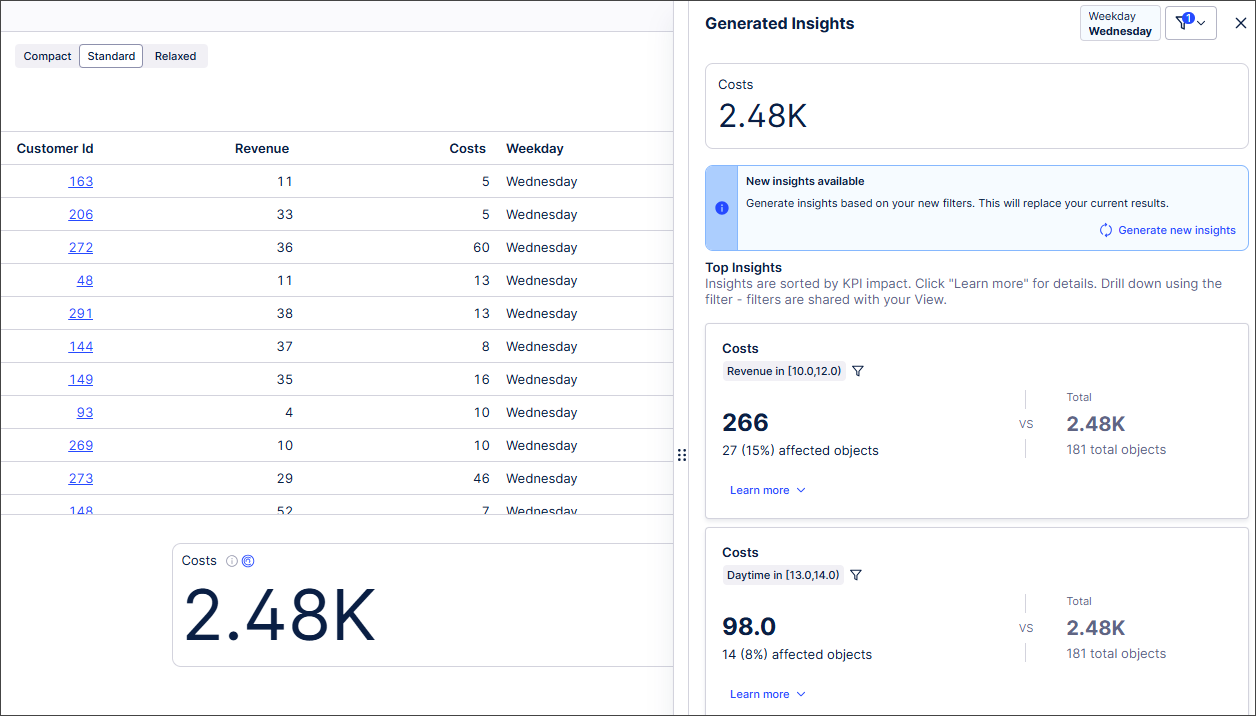
With this Private Preview release, you can now generate Insights from within Views.
Previously, users generated Insights about their data in Insight Explorer before exporting them to Views. Now users can create Insights directly within Views containing KPI list or card components and apply the resulting Insight filters directly to their View.
 |
For more information, see Generating Insights in a View.
And for more information about our private preview releases, see Feature release types.
IMPROVED STUDIO Visual enhancements for View components
In this bundled release, we’ve refreshed several View components with visual and functional updates to improve the look, feel, and usability of your dashboards and applications. These changes reduce wasted space, standardize the UI, and add new customization options for greater information density.
The highlights include:
Optimized KPI values: KPI values now scale to utilize more of the space available within the component.
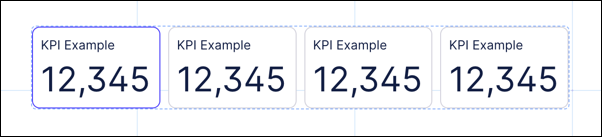
Enhanced KPI list component: We refined the clickable KPI list by reducing wasted space, removing unnecessary elements, and adding options for title removal and equal spacing to improve flexibility and visual balance.
Equal spacing for KPIs: You now have the option to equally space KPIs, improving visual balance.
Compact KPI display: We added the option to remove the title of the KPI, allowing for a more compact look and giving you greater flexibility in how KPIs are used throughout your view.
Fixed KPI sizes: You can now choose to leave your KPI size as “auto” or choose one of the fixed size options.
For example, this was the previous clickable KPI:

And with the visual enhancements and customizati:
To learn more about configuring a KPI list component, see: KPI cards and KPI lists.
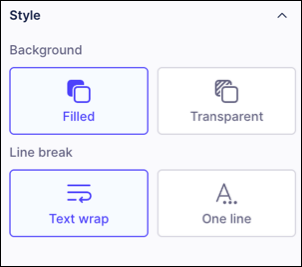
Textbox component overflow control: In the Textbox component, you can now define an overflow option of either truncation (...) or flowing to separate lines. This is especially helpful when using a textbox for a single-line label, as you can prevent it from flowing onto multiple lines and adding a scrollbar.
Removing unnecessary text: For the KPI Card, the "Related KPI" title is now only shown if trends are also enabled. When no trends are present, the title is removed to allow more space for the KPI values.
Reduced space between component and header: Many components had excessive spacing between the component and the header text. This has been reduced and standardized across all components.
For example, this was the previous chart component:
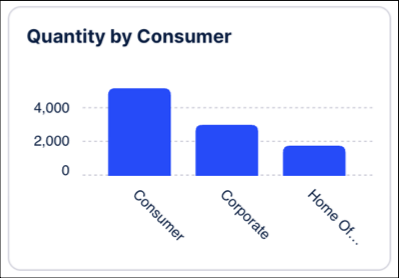
And now with the visual enhancements:
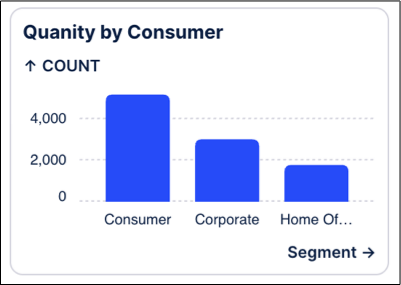
To learn more about available Studio components, see: Components.
IMPROVED DATA INTEGRATION Increased string length limit for Cloud Extractors
Previously, Celonis limited string values in Cloud Extractors to a maximum of 80 characters. Based on customer feedback, this character limit has been increased. Cloud Extractors now support string values of up to 8 KB, with an increase to 65 KB planned in the coming weeks.
Important: Celonis dynamically determines column widths based on actual data to optimize performance and avoid unnecessary processing overhead. However, manually created tables, especially VARCHAR columns defined during the transformation phase, may require manual adjustment if incoming values exceed the existing column size.
If column widths are not updated, you may encounter transformation errors such as:
String of 82 octets is too long for type Varchar(80)
For extraction task best practice, see: VARCHAR optimization.